
Submitting patient transition data in ShareFile
Your step-by-step guide to validating rosters, completing required templates, and uploading patient documents in ShareFile
Key contact information
-

DME Provider Support Line:
888.801.9449 -
Email:
dmeprovidersupport@synapsehealth.com


Streamline the submission of patient transition data and documentation to ensure a smooth handoff of care. This workflow provides a guide to validating rosters, completing required templates and uploading key documents in ShareFile. Prevent delays and ensure patients continue to receive the DME they need without interruption!
Logging in and finding the correct folder
Log into ShareFile and navigate to the Patient Transitions folder.
On the left side of the home page, go to Folders > Shared Folders > Patient Transitions.
Opening your provider folder
What you’ll find inside your folder
Inside your folder, you’ll find 4 subfolders.
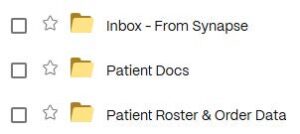
Open the one labeled Inbox – From Synapse.
Completing your data validation tool
Locating your Supplier Data Validation template
Your Inbox contains a file titled [ProviderName]_SupplierData-Validation_[Date] Template.
Using the Instructions tab to complete your data validation
Review the Instructions tab and reference it to complete your Data Validation.
Submitting required files and documentation to ShareFile
Submit required files and documentation into ShareFile > Folders > Shared Folders > Patient Transitions.
Where each file goes
| What to upload | Where to upload it |
|---|---|
| Your completed Supplier Data Validation workbook | Patient Transitions > Patient Roster & Order Data > [corresponding Go-Live folder] |
| Patient Documentation (to include original POD & latest RX, at a minimum) | Patient Transitions > Patient Docs > [corresponding Go-Live folder] |
What happens after you upload your documents
After your upload
- Please note that documents are automatically moved from Patient Docs to the Processed folder.
- We will reach out to you if we find that anything is missing after our documentation review.
- See Supplier Data Standards for additional criteria.
Getting help with a patient transition submission
DME provider support
-
Email:
dmeprovidersupport@synapsehealth.com -
Phone:
888.801.9449