


Manage your medical
equipment with ease
The Synapse Health patient portal helps you keep everything organized — sign forms, track orders, and update your information anytime.



We’re here to make things easier for you
Your Synapse Health patient portal puts all your equipment and supply information in one secure place, so you can save time and get help faster.

Less paperwork
Fill out and sign forms online — no printing or mailing.

Easy updates
Change your address, phone, or insurance anytime.

Order tracking
See where your equipment is and when it will arrive

All in one place
Manage everything from one simple dashboard.
What’s inside the patient portal
Sign and submit forms
Complete important paperwork online, in English or Spanish. A green checkmark confirms when you’re done.
Check and update your information
Review and edit your contact, address, and insurance details. Choose email or text for updates.
Verify your equipment
View what you have, confirm deliveries, or let us know if something’s missing.
Add a payment method
Set up autopay to stay current on bills — your information stays protected.
Track your orders
View current and past orders with real-time delivery updates.
Set up resupply
Quickly and easily reorder eligible medical supplies within the portal.
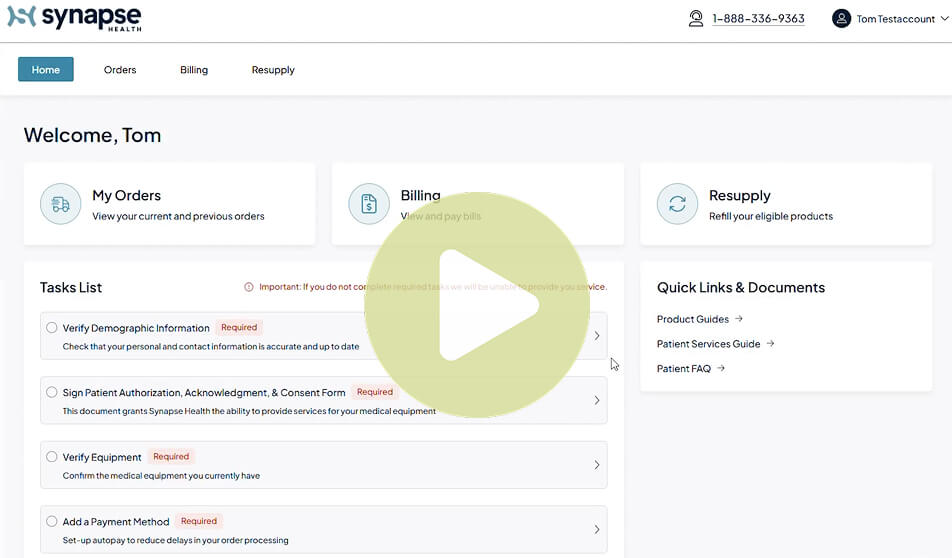
View a demo of the patient portal
Learn how to use the Synapse Health patient portal by watching a brief video demo. Then get started by creating your account.


- You can track any member order using our guest log in
- Just scroll to the bottom of the log in page; enter the order number where it says “Track order as guest”

